PS2 BIOS Files: Download USA, PAL, Japan and China Versions
All four PS2 BIOS regions, free and ready to use. Pick the file that matches your games, extract it, and point your emulator at it.
Works with PCSX2, AetherSX2, NetherSX2, RetroArch, EmuDeck, ArmSX2 and DamonPS2 on Windows, macOS, Linux, Android and Steam Deck.
All files are ZIP archives. Extract them before use — emulators cannot read a zipped BIOS.
📖 New to this? Follow our step-by-step installation guide after downloading.
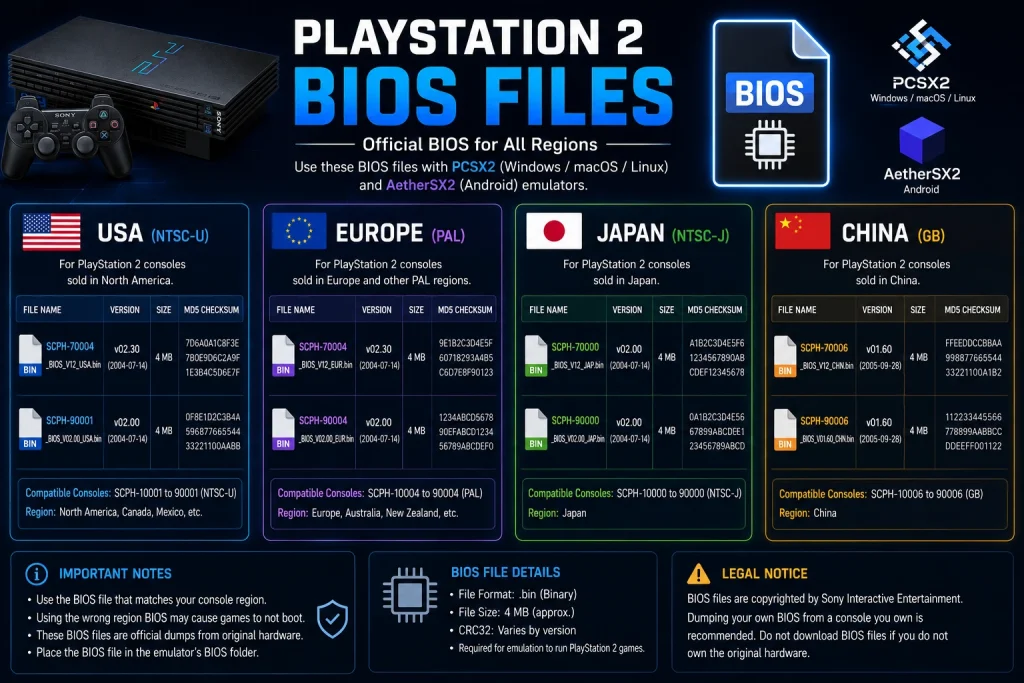
Which File Should You Download?
Answer one question: where did your games come from?
| Your games | Download this |
|---|---|
| Mostly US releases | USA (NTSC-U) |
| Mostly UK or European releases | Europe (PAL) |
| Japanese imports or exclusives | Japan (NTSC-J) |
| Chinese-market releases | China (NTSC-C) |
| A mix of regions | Full BIOS Pack |
| No idea | Full BIOS Pack |
Still unsure? Take the Full Pack. It contains every region, weighs under 20 MB, and lets you switch versions inside your emulator in two clicks. There is no downside to having all four installed at once.
How to Find Your Game’s Region
Every PS2 game carries a serial code. The first four letters give away the region:
| Serial prefix | Region | Use this BIOS |
|---|---|---|
| SLUS / SCUS | USA & Canada | NTSC-U |
| SLES / SCES | Europe, UK, Australia | PAL |
| SLPS / SLPM / SCPS | Japan | NTSC-J |
| SLKA / SCKA | Korea | NTSC-J |
| SLAJ / SCAJ | Asia (general) | NTSC-J or PAL |
| SLPN | China | NTSC-C |
You will find the serial printed on the disc face, inside the ISO filename, or by right-clicking the game in PCSX2 and opening Properties.
What’s Inside Each Download
Extract any of the ZIP files above and you will see several files. Here is what each one does:
| File | What it is | Needed? |
|---|---|---|
| .bin | The main BIOS ROM — the core file | Essential |
| .nvm | Stores region, language and console settings | Recommended |
| .mec | MechaCon firmware — controls the disc drive | Recommended |
| .erom | DVD player ROM | Optional |
| .rom1 | DVD player firmware | Optional |
| .rom2 | Chinese language ROM (Chinese consoles only) | Optional |
Two rules:
- Keep every file in the same folder. Only the .bin is essential, but the companions sit alongside it and prevent rare edge-case problems.
- Do not rename anything. The companion files must share the base name of the .bin. For example, scph39001.bin pairs with scph39001.nvm. Break the pairing and things stop working.
USA BIOS (NTSC-U)
The most widely used PS2 BIOS in the emulation community.
- Covers: United States and Canada
- Video standard: NTSC, 60Hz
- Models included: SCPH-39001 (v1.60), SCPH-70012 (v2.00)
- Menu language: English
- Compatibility: highest of any region — almost every online tutorial, preset and compatibility report assumes NTSC-U
Games it suits: GTA San Andreas, God of War, Final Fantasy X, Tony Hawk’s Pro Skater, Kingdom Hearts, Resident Evil 4 and the rest of the North American library.
💡 If you install only one BIOS for the rest of your life, make it SCPH-39001. It is the safest, most tested option across the entire PS2 catalogue.
Europe BIOS (PAL)
- Covers: UK, Europe, Australia, parts of Asia and Africa
- Video standard: PAL, 50Hz
- Models included: SCPH-50003 (v1.70), SCPH-75004 (v2.00)
- Menu languages: English, French, Spanish, German, Italian, Dutch, Portuguese
- Compatibility: strong for PAL releases
Why the region matters here: PAL games were built around a 50Hz display. Running them on an NTSC BIOS can cause speed and timing oddities — audio drifting out of sync, cutscenes playing at the wrong pace, occasional save failures.
Games it suits: Pro Evolution Soccer, PAL-exclusive sports titles, and any game bought in the UK, Europe or Australia.
Japan BIOS (NTSC-J)
- Covers: Japan and nearby Asian markets
- Video standard: NTSC, 60Hz
- Models included: SCPH-10000 (v1.00), SCPH-18000 (v1.01)
- Menu language: Japanese
- Compatibility: essential for Japanese exclusives
A historical note: SCPH-10000 was the very first PS2 BIOS Sony ever shipped, back in March 2000. It is fascinating but limited — support for later games is patchy. SCPH-18000 is the safer everyday choice if you are playing Japanese titles.
Games it suits: original Japanese releases of Ico, Katamari Damacy, Dragon Quest VIII, and the many titles that never left Japan.
China BIOS (NTSC-C)
- Covers: mainland China
- Video standard: NTSC-C
- Model included: SCPH-70000
- Compatibility: limited to China-region titles
The least common of the four. You only need this one if you are specifically playing Chinese-market releases. Everyone else can skip it.
BIOS Files by Emulator
The same .bin file works everywhere. Only the folder path changes.
PS2 BIOS for PCSX2
PCSX2 is the desktop standard for Windows, macOS and Linux.
- Download the Full Pack or your regional file
- Extract it
- Go to Settings > BIOS > Browse and select the folder
- Pick your version from the list and click Apply
Default folder: C:\Users\[Name]\Documents\PCSX2\bios\ on Windows.
PS2 BIOS for AetherSX2 and NetherSX2
The leading Android emulators. Both handle BIOS files identically.
- Download and extract using ZArchiver
- Save to internal storage, not an SD card — Android permissions often block SD card access
- Open the app, tap + on the BIOS screen, and select your .bin file
Recommended for Android: SCPH-39001 (USA). It gives the widest compatibility with the least fuss.
PS2 BIOS for RetroArch
RetroArch is strict about folder structure.
- Path must be exactly system/pcsx2/bios/
- Both folder names must be lowercase — PCSX2 will fail silently
- Requires the LRPS2 core, which needs x86_64 hardware (so not most Android phones)
PS2 BIOS for Steam Deck and EmuDeck
- Place the extracted .bin directly in /home/deck/Emulation/bios/
- No subfolders. Do not create a PS2 or pcsx2 folder inside it
- Verify with EmuDeck > Tools and Stuff > BIOS Checker
📖 Full instructions for every platform, including iPhone and Xbox: How to install PS2 BIOS
Check Your Download Is Complete
Corrupted downloads cause errors that look like emulator bugs. Two quick checks save a lot of confusion.
1. Check the file size
A single-region .bin should be around 4 MB (4,194,304 bytes). If yours is a few kilobytes, the download failed. If it is hundreds of megabytes, you grabbed the wrong file.
2. Check the fingerprint (optional but reliable)
| System | Command |
|---|---|
| Windows | certutil -hashfile scph39001.bin MD5 |
| macOS | md5 scph39001.bin |
| Linux | md5sum scph39001.bin |
| Android | Use a hash checker app, or verify the size in ZArchiver |
Compare the result against the checksum list on the PCSX2 wiki or the Redump database.
3. Easiest check of all
Install it and open Settings > BIOS in PCSX2. If your file shows up with a full version string — such as SCPH-39001 v1.60 (07/02/2002) Console — the file is valid and readable.
Install in 3 Steps
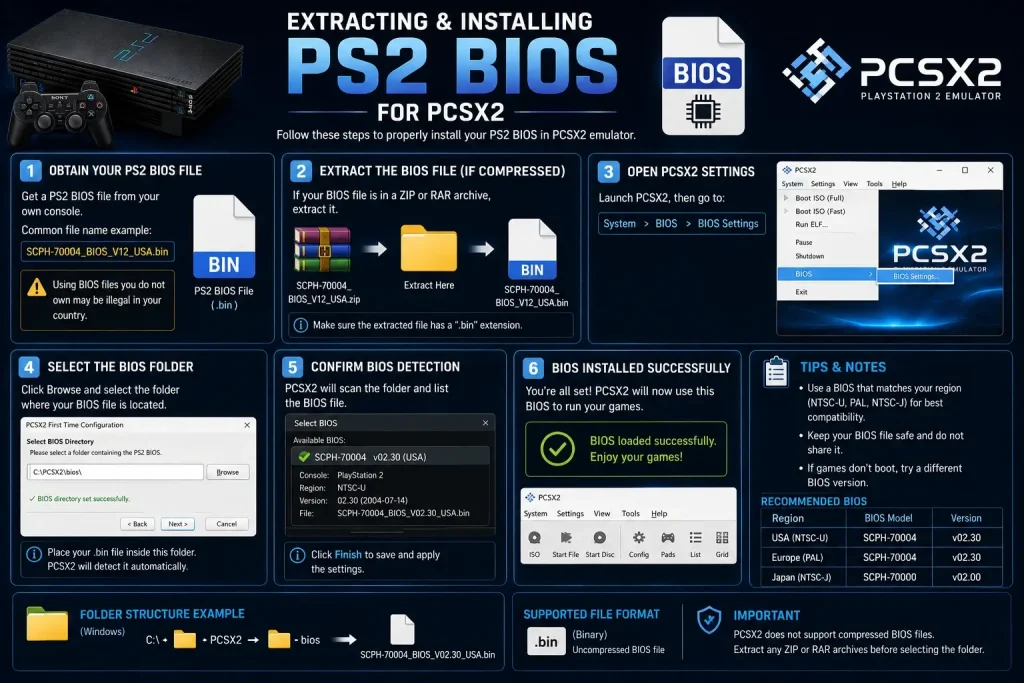
- Extract the ZIP completely. Right-click > Extract All on Windows. Use ZArchiver on Android. Never drag files out of the ZIP preview window.
- Copy the .bin file into your emulator’s BIOS folder.
- Open your emulator, go to BIOS settings, point it at the folder, and select your version.
⚠️ The single biggest mistake: leaving the file inside the ZIP. Every emulator reads the raw .bin directly. A zipped BIOS will never be detected, no matter where you put it.
📖 Read the full installation guide →
Download Problems and Fixes
The download will not start
- Try a different browser — some extensions block direct file downloads
- Turn off your ad blocker for this page
- Check your connection is stable
Your antivirus deleted the file
This is a false positive. Some antivirus tools flag emulator-related files as suspicious because of how they are packaged.
- Open your antivirus quarantine folder and restore the file
- Add your BIOS folder to the exclusions list
- Download again
The ZIP will not extract
- Use 7-Zip on Windows, The Unarchiver on macOS, or ZArchiver on Android
- Windows’ built-in extractor sometimes struggles with older archives
- If it still fails, the download is corrupted — get it again
The download stops partway
- Resume it if your browser offers the option, or start fresh
- Avoid downloading over an unstable mobile connection
- Check you have free storage space
“BIOS not found” after installing
- Confirm the file is extracted and ends in .bin
- Make sure the folder contains the .bin directly, not inside another folder
- Reselect the folder manually in your emulator, even if the path already looks correct
Black screen after loading a game
Usually a region mismatch. Check your game’s serial prefix in the table above and switch to the matching BIOS.
Are These Files Safe?
- No installers, no bundled software — these are plain ZIP archives containing BIOS files and nothing else
- No sign-up, no email, no account required
- No waiting timers, link shorteners or survey walls — the download starts when you click
- Tested across emulators — verified working on PCSX2, AetherSX2, NetherSX2 and RetroArch
If your antivirus flags a file, it is a false positive caused by how emulator files are packaged. You can confirm this yourself using the checksum method above.
Is Downloading a PS2 BIOS Legal?
Worth being direct about this.
The PS2 BIOS is copyrighted software owned by Sony Interactive Entertainment. The only method that is legal everywhere is dumping the BIOS from a PlayStation 2 console you own yourself. The PCSX2 team recommends exactly this in their own documentation.
Downloading a BIOS from a third-party site may breach copyright law depending on where you live — even if you already own a console. Rules differ between countries, so the responsibility for staying compliant sits with you.
If you own a PS2, dumping your own BIOS takes about 20 minutes and works on both modded and unmodded consoles. Our guide walks through the whole process: how to dump a PS2 BIOS from your own console.
These files are hosted for preservation and educational purposes, aimed at people who already own the original hardware. Rights holders can request removal through our DMCA policy.